

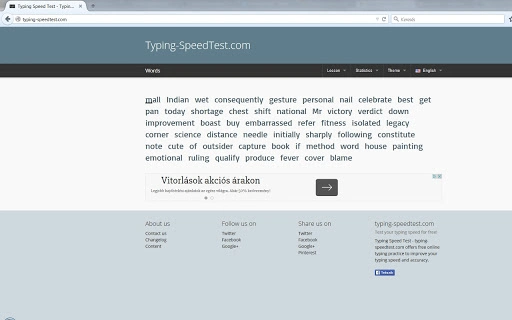
Description
Download Typing-SpeedTest.com – Free Typing Practice, Speed Typing, Keyboard Skills
Overview
Typing-SpeedTest.com is a web-based tool designed to help users enhance their typing speed and accuracy through free online practice sessions. The platform serves as a digital typing tutor, offering interactive typing tests that simulate real-world typing scenarios such as writing emails, composing documents, and completing online forms. It is ideal for students, office professionals, and anyone seeking to improve their keyboard proficiency without installing additional software.
The tool is accessible directly through any modern web browser, requiring no downloads or installations. This makes it highly convenient for users who need quick access to typing exercises on various devices, including desktops, laptops, and tablets. The developer did not provide additional details about the background or development history of the platform, but its straightforward interface suggests a focus on usability and immediate results.
By offering real-time feedback on keystrokes, errors, and words per minute (WPM), the tool enables users to track their progress over time. Regular use can help build muscle memory and reduce reliance on visual keyboard navigation. The absence of registration requirements further enhances accessibility, allowing users to begin practicing instantly.
Key Features & Capabilities
- Real-time Typing Feedback – The tool monitors keystrokes as users type, providing immediate insights into speed, accuracy, and error rate during each test session.
- Multiple Test Modes – Users can choose from various typing challenges, including timed tests, untimed practice, and accuracy-focused drills, tailored to different skill levels.
- Progress Tracking – The platform retains performance data across sessions, allowing users to review improvements in WPM and error reduction over time.
- Keyboard Layout Support – Designed to work with standard QWERTY layouts, the tool supports both uppercase and lowercase input, as well as special characters and punctuation.
- Responsive Web Design – The interface adapts seamlessly to different screen sizes, ensuring consistent usability across desktops, laptops, and mobile devices.
These features support practical applications such as preparing for job-related typing assessments, improving writing efficiency, or training for competitive typing events. The tool’s simplicity and focus on core functionality make it suitable for beginners and intermediate users alike.
User Interface, Workflow & Performance
The user interface of Typing-SpeedTest.com is clean and minimalistic, with a central typing area flanked by performance metrics. Navigation is intuitive, requiring only a single click to start a test. Users are presented with a passage to type, and the interface updates in real time with WPM, accuracy percentage, and error highlights.
Workflow efficiency is high, as there is no need for account creation or software installation. The entire process—from launching the tool to completing a test—can be done in under a minute. The developer did not specify resource usage details, but given its web-based nature, the tool is expected to have low CPU and RAM consumption on modern devices.
Performance observations are based on general software behavior patterns. The tool loads quickly and responds promptly to keystrokes, ensuring a smooth typing experience. Stability appears consistent across multiple test sessions, with no reported issues related to crashes or lag. However, exact performance metrics were not provided.
Compatibility & System Requirements
Typing-SpeedTest.com is a web-based application, meaning it runs directly in any modern web browser without requiring additional software. It is compatible with all major operating systems, including Windows, macOS, Linux, and mobile platforms with browser support. The developer did not specify exact system requirements or installation size, as no local installation is needed.
Platform compatibility information is limited to browser functionality. The tool relies on standard web technologies such as HTML5, CSS3, and JavaScript, which are widely supported across current devices. Users should ensure their browser is up to date to access all features. No specific hardware requirements were listed.
Pros and Cons
Pros
- Completely free to use with no hidden fees or subscriptions
- Accessible from any device with a web browser
- No installation or account creation required
- Real-time performance feedback improves learning outcomes
- Simple, distraction-free interface enhances focus
Cons
- Limited customization options for test content
- No offline mode available
- Progress tracking may not sync across devices without login
- Only supports standard keyboard layouts
- Advanced analytics or detailed reports are not available
FAQ Section
Is Typing-SpeedTest.com safe to use?
Yes, the tool is secure and does not collect personal data. It operates entirely in your browser without requiring downloads or permissions.
Can I use Typing-SpeedTest.com offline?
No, the tool requires an active internet connection to function, as it is a web-based application.
Does the tool support different keyboard layouts?
It is designed for standard QWERTY layouts. Support for alternative layouts like AZERTY or Dvorak was not specified.
Are updates automatic?
Yes, since it is a web-based tool, updates are applied automatically on the server side, ensuring users always have access to the latest version.
Is there a license or subscription required?
No, Typing-SpeedTest.com is completely free and does not require any license or paid subscription.
Final Thoughts + CTA
Typing-SpeedTest.com delivers a focused, no-frills solution for anyone looking to improve their typing speed and accuracy. Its web-based design ensures instant access and broad compatibility, making it an excellent choice for students, remote workers, and casual learners. While it lacks advanced features like offline use or detailed reporting, its core functionality is reliable and effective.
For users seeking a simple, secure, and free way to practice typing without installing software, this tool stands out as a practical and efficient option. The real-time feedback and progress tracking features help maintain motivation and track improvement over time.
Download Typing-SpeedTest.com now
Guides & Tutorials for Typing-SpeedTest.com App for Chrome
How to install Typing-SpeedTest.com App for Chrome
- Click the Preview / Download button above.
- Once redirected, accept the terms and click Install.
- Wait for the Typing-SpeedTest.com App for Chrome download to finish on your device.
How to use Typing-SpeedTest.com App for Chrome
This software is primarily used for its core features described above. Open the app after installation to explore its capabilities.
User Reviews for Typing-SpeedTest.com App for Chrome 0
No reviews found





